Stereo imaging is about width and space — making a mix feel bigger and giving instruments room to breathe. It's also one of the easiest things to overdo. Push it too hard and you get a mix that falls apart the second someone plays it on a phone speaker.
That last part is the real test. Good wideners hold up in mono. Bad ones collapse and leave you wondering where your low end went.
All five picks here are current and actively supported, and they're all worth your time for different reasons. One quick honesty note before we start: width is a subtle tool. Use headphones to hear the differences between these, because a lot of what makes imaging good or bad happens in details you won't catch on laptop speakers. And as always — less is more.
TABLE OF CONTENTS
What a stereo imaging plugin actually does
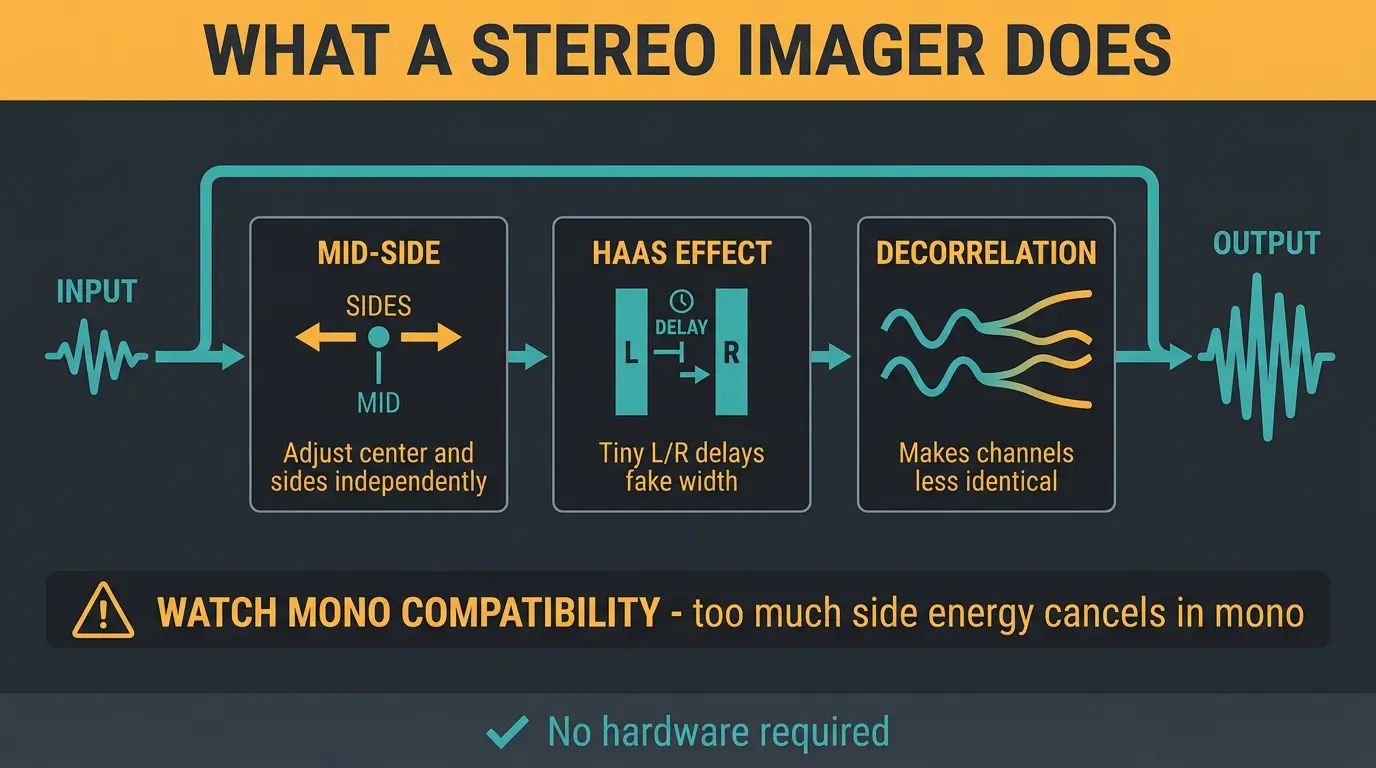
At its core, a stereo imaging plugin lets you widen or narrow the stereo field, add a sense of space, and control how your mix holds up in mono. Most of them get there using one of a few tricks.
- Mid-side processing splits the signal into the center (mid) and the sides, so you can turn the sides up or down independently.
- Haas effect uses tiny delays between left and right to trick your ears into hearing width.
- Decorrelation makes the two channels less identical, which spreads the sound out without an obvious delay.
Here's the catch with all of them: mess with the sides too much and you invite phase problems. When left and right fight each other, the sound cancels out when the mix folds down to mono — and suddenly your widened track disappears. That's why mono compatibility is the thing that separates a good imager from a toy.
And no, you don't need hardware for any of this. In-the-box imaging is every bit as capable as an analog rack. The plugins below hold their own against anything, so put the "you need real gear" argument to rest.
The short version
- iZotope Ozone Imager 2 — the free do-it-all that punches way above its price of nothing.
- SSL Fusion Stereo Image — natural, 3D depth for tasteful space on a mix bus.
- Nugen Audio Stereoizer — clean widening with rock-solid mono compatibility.
- Leapwing StageOne 2 — the best-sounding premium option for serious imaging.
- Waves S1 Stereo Imager — the reliable, no-frills workhorse.
Izotope Ozone 10 Imager
#1
Best Overall
Izotope Ozone 10 Imager
Adjusting the stereo width of your master accurately is made seamless with the Imager module, which allows up to four frequency bands and independent control over each. This is facilitated with an integrated Vectorscope and Correlation Meter, providing invaluable visual feedback during the mastering process.
Notably, the Imager features a 'Recover Sides' option which, when reducing width, enables you to reintroduce any removed side channel information. Additionally, two new gauges are available: the 'Stereoize' gauge, which can be used when enhancing the stereo image by boosting width, and the 'Recover Sides' gauge, which becomes active when cutting width to preserve stereo information in the mono.
For a richer sound, add depth and a natural-sounding stereo width to mono or extremely narrow mixes using two Stereoize modes: Stereoize I for a classic, colorful stereo effect, and the newly introduced Stereoize II for more subtle stereo enhancement. The innovative Antiphase Prevention feature allows you to add width to any frequency band without risking mono compatibility issues.
The Stereo Width Spectrum view provides a comprehensive overview, enabling you to observe the width of your mix by frequency, set crossovers, and observe the impact of stereo imaging adjustments on various parts of the spectrum. Moreover, it is simple to test your stereo signal for mono compatibility or left/right signal reversal.
Pros
- Allows for low end frequency cut-off so the bass isn't widened.
- Can control stereo width and depth independently.
- Has great starting presets.
Cons
- On the higher end price wise.
- Can only treat the overall frequency and not specific bands independently.
SSL Fusion Stereo Image
#2
Runner-up
SSL Fusion Stereo Image
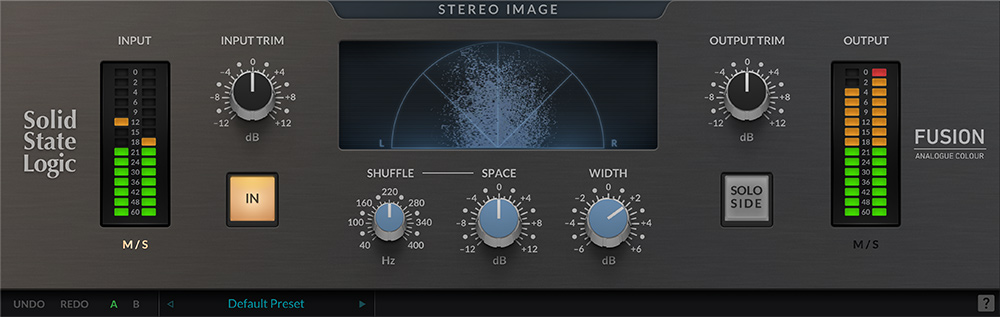
This one brings the mid-side circuit from SSL's Fusion hardware into the box. It's known for natural, 3D depth — width, depth, and a real sense of space around instruments, vocals, and full mixes. It runs as VST, VST3, AU, and AAX, and it's still actively supported, available perpetually or through the SSL Complete subscription.
Here's the honest take: this isn't the plugin you reach for when you want extreme widening. It's about tasteful space, and a scenario where it shines is a mix bus that already sounds good but feels a little flat or boxed-in. Add a touch of Fusion and things open up without sounding processed.
If your goal is depth rather than a wall of stereo, this is a strong choice.
Pros
- Natural, 3D sense of depth
- Excellent on the mix bus and stereo groups
- Available perpetually or via subscription
Cons
- Not built for aggressive widening
- Subtle enough that you'll want headphones to judge it
Nugen Audio Stereoizer
#3
Top Pick
Nugen Audio Stereoizer
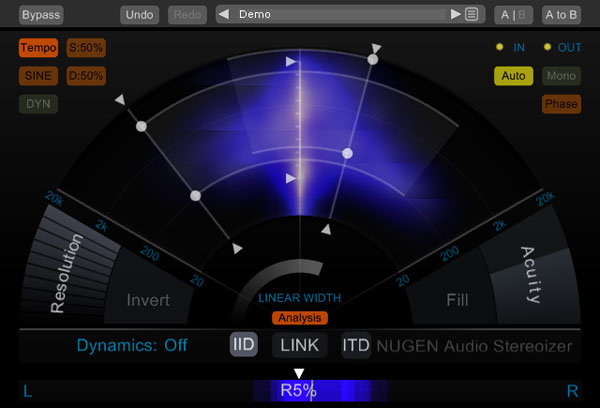
Nugen Stereoizer adds natural width with full mono compatibility and no artefacts — that's really its whole pitch, and it delivers. It's on the 3.5.x line now, running as AAX, VST3, AU, and AudioSuite in 64-bit.
One thing to know: Nugen is phasing out older formats. The newest builds drop 32-bit and RTAS/VST2, though legacy installers still live in the Build Archive if you're on an older setup. There's also a simpler one-knob sibling called Stereoizer Elements — think of it as a companion for quick jobs, not a replacement for the full version.
Honestly, it's rock solid and mono-safe, which is exactly what you want from a widener. With that being said, one 2024 comparison found it slightly less organic-sounding than Leapwing and iZotope. It's still excellent — just worth knowing where it lands against the pack.
Pros
- Total mono compatibility with no artefacts
- Clean, dependable widening
- Simpler Stereoizer Elements available for quick tasks
Cons
- Slightly less organic than the top-tier options
- Older format support is being phased out
Leapwing StageOne 2
#4
Top Pick
Leapwing StageOne 2
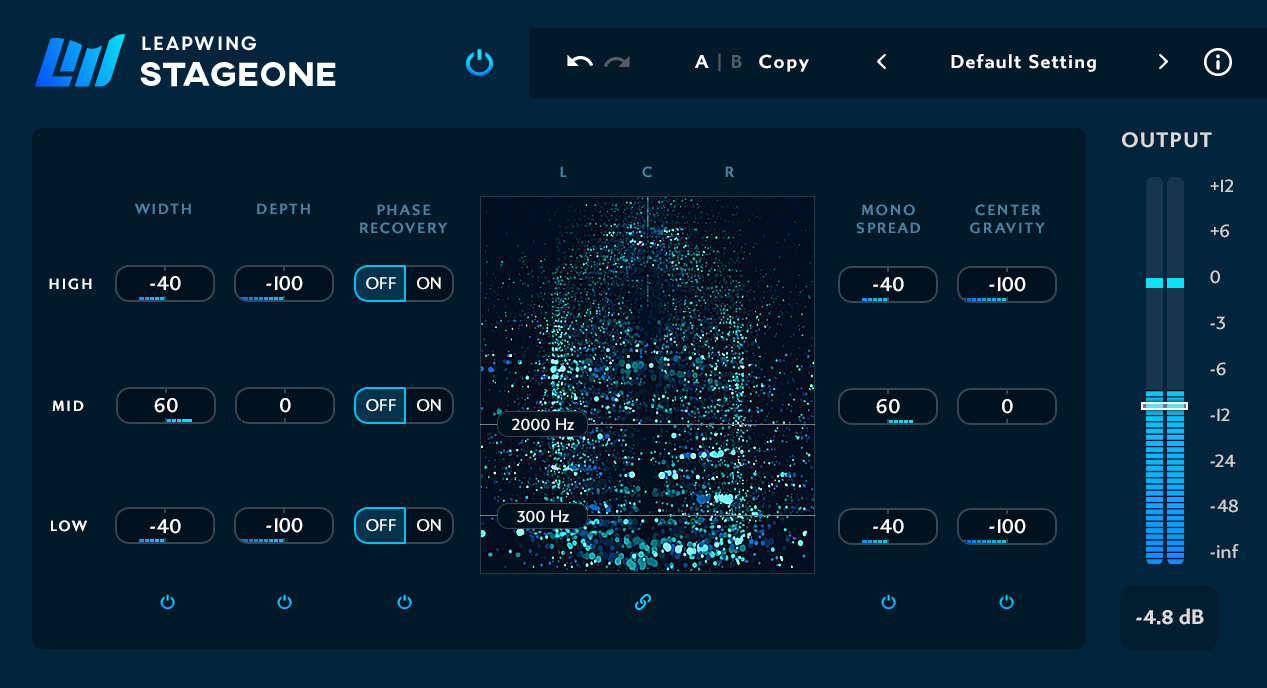
If you want the best-sounding imager in the category, this is the one people keep pointing to. The v2 overhaul is a comprehensive rework, giving you 3-band control with five algorithms: Width, Depth, Phase Recovery, Mono Spread, and Center Gravity. It runs as AAX, AU, VST, and VST3.
In a 2024 three-way test, StageOne 2 kept the high end intact even when pushed hard, and it cleaned up the center in a way the others didn't quite match. That's the kind of thing you notice on a master where every detail counts.
The honest take: it's the priciest option here, and you can hear where the money goes. This is the pick for people serious about mastering-grade imaging. If you're finishing tracks and want the cleanest possible width, it earns its spot. For more on the finishing stage, our roundup of the best mastering plugins pairs nicely with this.
Pros
- Best-sounding of the bunch, especially when pushed
- Five algorithms give real, flexible control
- Preserves high end and cleans up the center beautifully
Cons
- The most premium option here
- More depth than a beginner may need
Waves S1 Stereo Imager
#5
Lowest Price
Waves S1 Stereo Imager
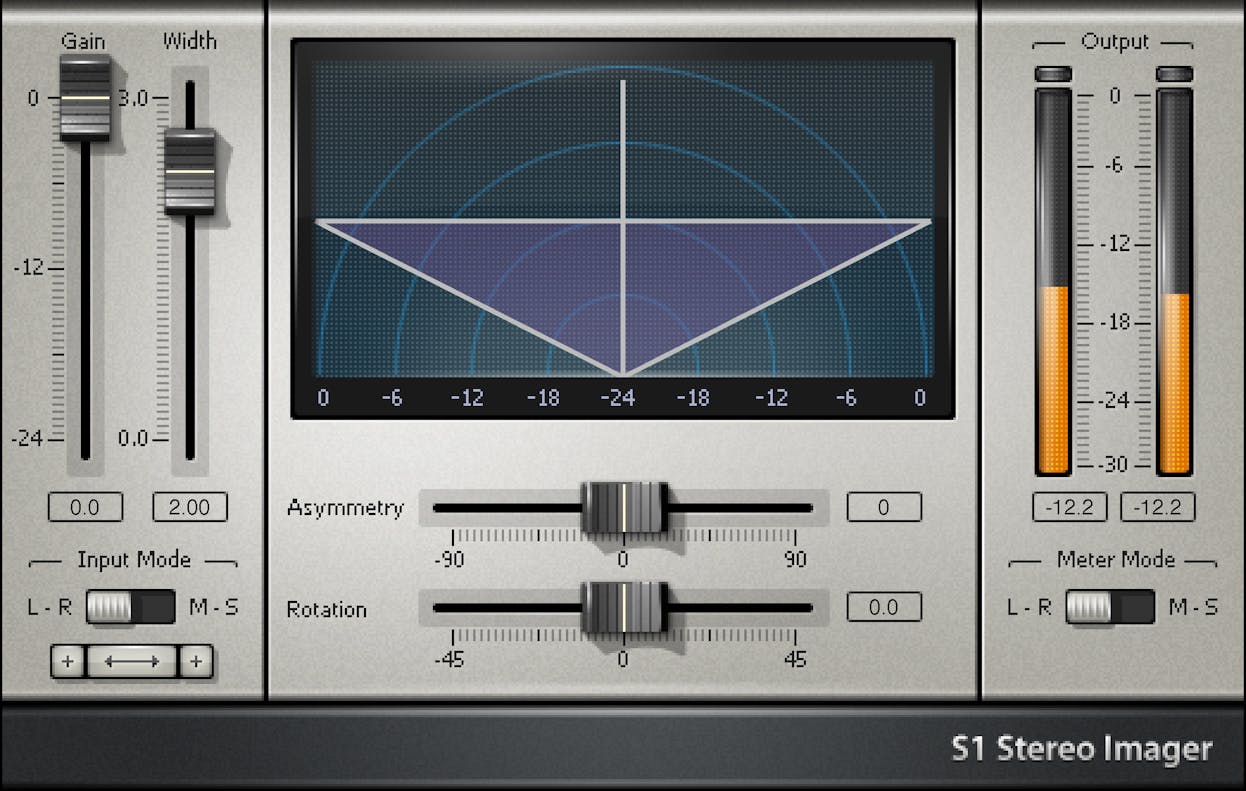
The Waves S1 is a classic — a widening tool you'll find in countless studios, and the most cost-effective reliable workhorse on this list. It's great on stereo tracks and full mixes for adding separation and dialing in spatial control. Waves keeps it current through the V-series updates, and it runs on modern macOS and Windows as VST, AU, VST3, and AAX.
The honest take: it's old-school and simple, and that's exactly the appeal. No fancy multiband, no algorithm menus — just dependable stereo control that does what you ask and gets out of the way. If you already live in the Waves ecosystem, it slots right in. Fans of the brand might also like our picks for the best Waves plugins we use in every mix.
Pros
- Simple, dependable, and fast to dial in
- Kept current through Waves V-series updates
- A proven studio staple
Cons
- No multiband or advanced imaging features
- Less flashy than newer competitors
| Plugin | Best for | Formats |
|---|---|---|
| iZotope Ozone Imager 2 | A free do-it-all with multiband imaging | AU, AAX, VST2, VST3 |
| SSL Fusion Stereo Image | Natural 3D depth on the mix bus | VST, VST3, AU, AAX |
| Nugen Audio Stereoizer | Clean, mono-safe widening | AAX, VST3, AU, AudioSuite |
| Leapwing StageOne 2 | Mastering-grade, best-sounding imaging | AAX, AU, VST, VST3 |
| Waves S1 Stereo Imager | A simple, reliable widening workhorse | VST, AU, VST3, AAX |
Frequently Asked Questions (FAQs)
What's the difference between a stereo imager and a widener?
A widener only pushes the stereo field wider, while an imager gives you fuller control over the whole stereo picture — widening, narrowing, mid-side balance, and often multiband adjustment. Most modern "imagers" can widen, but not every widener can properly image. Imagers just give you more tools to work with.
Do stereo imaging plugins hurt mono compatibility?
They can, if you overdo the widening, because pushing the sides too hard causes phase cancellation that makes sound disappear in mono. Good imagers like the ones here are built to protect mono compatibility. Always check your mix in mono, and make sure you keep the low end centered.
Is a free plugin like Ozone Imager 2 good enough?
Yes, Ozone Imager 2 is good enough for most mixing and mastering work, with multiband imaging, a vectorscope, and clean widening at no cost. The premium options edge it out on the finest details, but for the majority of songs, the free version does a genuinely great job.
Should I image the whole mix or individual tracks?
Do both, depending on the goal — image individual tracks like synths or backing vocals to place them in the stereo field, and image the full mix gently for overall polish. Just go lighter on the master. Less is more when you're touching the whole song at once.
Do I apply imaging to stems or multitracks when mastering?
In mastering you're usually working on the full stereo mix, not stems. Quick terminology note: stems are submixes, like a grouped drum or vocal bus, while multitracks are the individual channels. It matters because a proper stem master lets you image, say, just the drum submix without touching the vocals.
Final Thoughts
If you want one plugin to start with, grab Ozone Imager 2 — it's free and it'll teach you a lot about how width actually works. When you're ready to spend, StageOne 2 is the top of the heap, with Fusion, Stereoizer, and the S1 all filling their own niches nicely.
Whatever you pick, trust your ears and check your mix in mono before you commit. Width is a spice, not a main course. A little goes a long way, and your future self will thank you for the restraint.
Some of the links within this article are affiliate links. These links are from various companies such as Amazon. This means if you click on any of these links and purchase the item or service, I will receive an affiliate commission. This is at no cost to you and the money gets invested back into Audio Sorcerer LLC.