The Haas effect is a psychoacoustic trick for making a mono sound feel wide. You duplicate a track, delay one side by a few milliseconds, and suddenly a flat, centered sound spreads across the stereo field. It works, and it's been working for decades.
But there's a catch most tutorials skip right over, and it can wreck your mix the second someone plays it on a phone speaker or a club system. That catch is mono. So let's talk about what the effect actually is, where it really came from, and how to use it without shooting yourself in the foot.
TABLE OF CONTENTS
What the Haas effect actually is
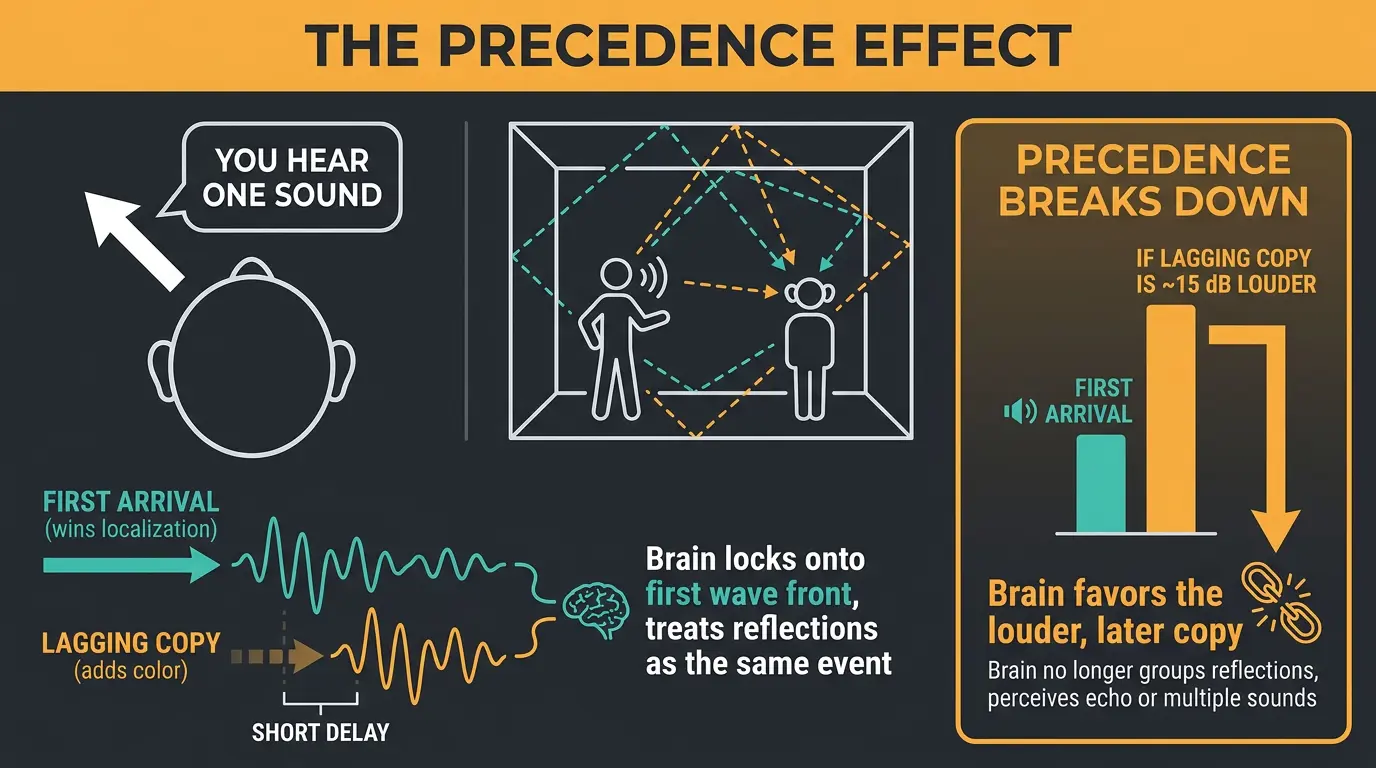
The Haas effect is also called the precedence effect, and here's the plain version. When two copies of the same sound reach your ears separated by a short enough delay, you don't hear two sounds — you hear one. And its location is dominated by whichever copy arrives first. The lagging copy still colors things, but the first wave front wins.
This isn't just a studio trick. It's how you localize sound in a real, reflective room. Someone talks across a hall and the sound bounces off every wall, but you still point right at them, because your brain locks onto that first arrival and treats the reflections as part of the same event.
There's a limit to it, though. If the lagging sound is roughly 15 dB louder than the first one, precedence breaks down and your brain starts favoring the louder, later copy instead. So it's not magic — it's a specific behavior with specific boundaries.
Where the name comes from (and why it's a bit of a misnomer)
Helmut Haas gets his name on this thing, but he didn't discover it. His 1949 thesis and his influential 1951 paper studied how a single reflection affects speech intelligibility, and that work is genuinely important. He just wasn't first.
Lothar Cremer described the law of the first wavefront in 1948, a year before Haas. Wallach and his colleagues named the precedence effect in 1949 and showed that two identical sounds in quick succession fuse into one. And you can trace the idea all the way back to Joseph Henry, who wrote about it in 1851.
So Haas is really the popularizer, not the discoverer. Terminology matters, and it's worth getting the history right. If you want to go deeper, the precedence effect writeup covers the research chain in more detail.
The delay window that makes it work
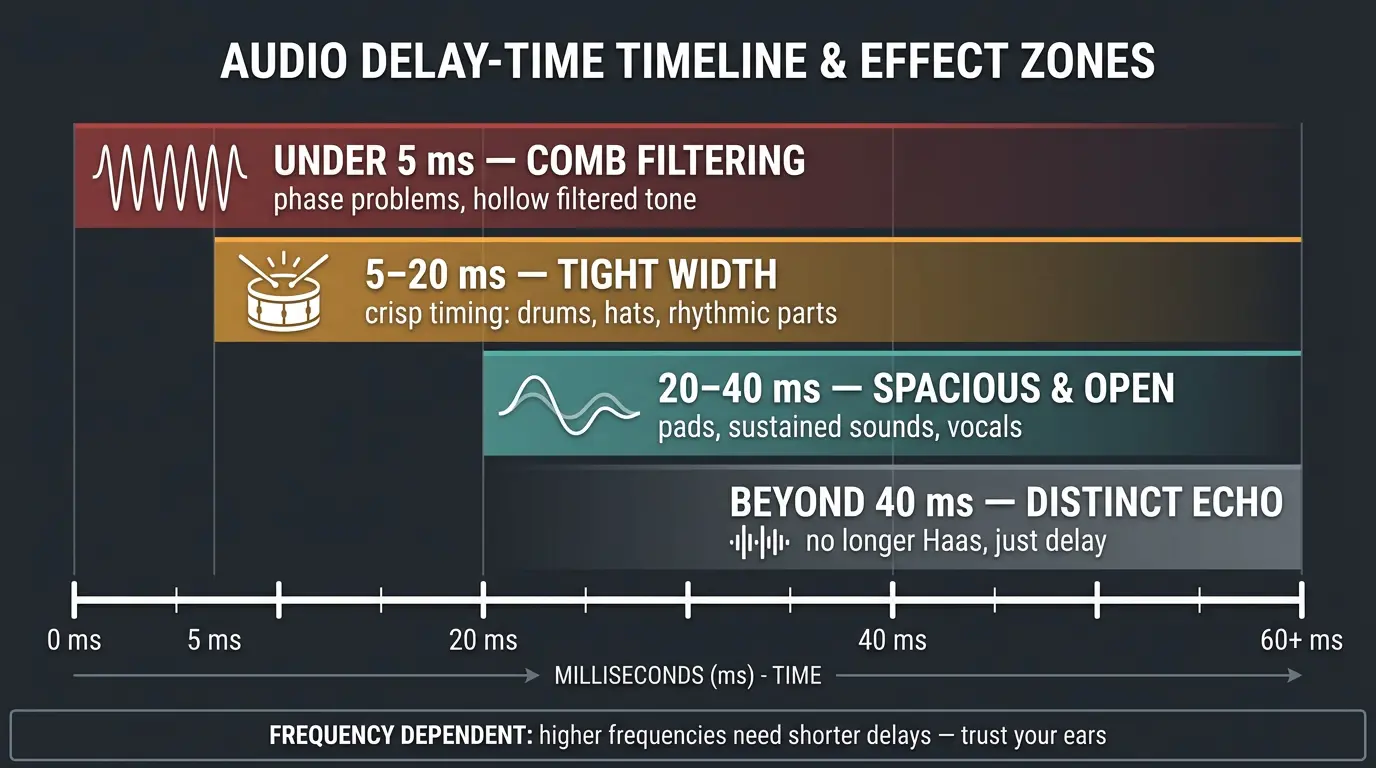
This is the part that actually matters when you sit down to use it. The whole effect lives inside a narrow window of delay times, and where you land in that window changes what you get.
- Under about 5 ms — you're in comb filtering territory. Instead of width, you get phase problems and a hollow, filtered tone.
- 5 to 20 ms — tight, focused width. Great for drums, hats, and rhythmic parts where you want the timing to stay crisp.
- 20 to 40 ms — more spacious and open. This range works nicely on pads, sustained sounds, and vocals.
- Beyond about 40 ms — you start hearing it as a distinct echo. At that point it's not the Haas effect anymore, it's just a delay.
One more thing: it's frequency dependent. Higher frequencies need shorter delays to give you the same sense of width as lower ones. So don't treat these numbers as gospel — they're a starting point. Trust your ears inside the range.
How to use the Haas effect in a mix
The basic move is simple. Duplicate a mono track, pan the two copies hard left and hard right, then delay one channel somewhere in the 10 to 35 ms range. That's it. The sound spreads out and feels wider than it did.
A scenario where this might be useful is a lead vocal that feels a little narrow but you don't want to pull it off center. A gentle Haas delay widens it while keeping the focus in the middle. It's also handy on drum overheads, hats, doubled guitars, and pads. It even shows up in live sound, where delayed loudspeakers get timed so the audience still localizes everything back to the main stage.
Here's where less is more comes in. If you Haas everything, nothing sounds wide — you've just made a smeared, phasey mix where every part is fighting for the same space. Be selective. Pick the one or two elements that genuinely need width and leave the rest alone. If you're widening vocals specifically, it pairs well with the other moves in our guide on mixing vocals.
The mono trap nobody warns you about
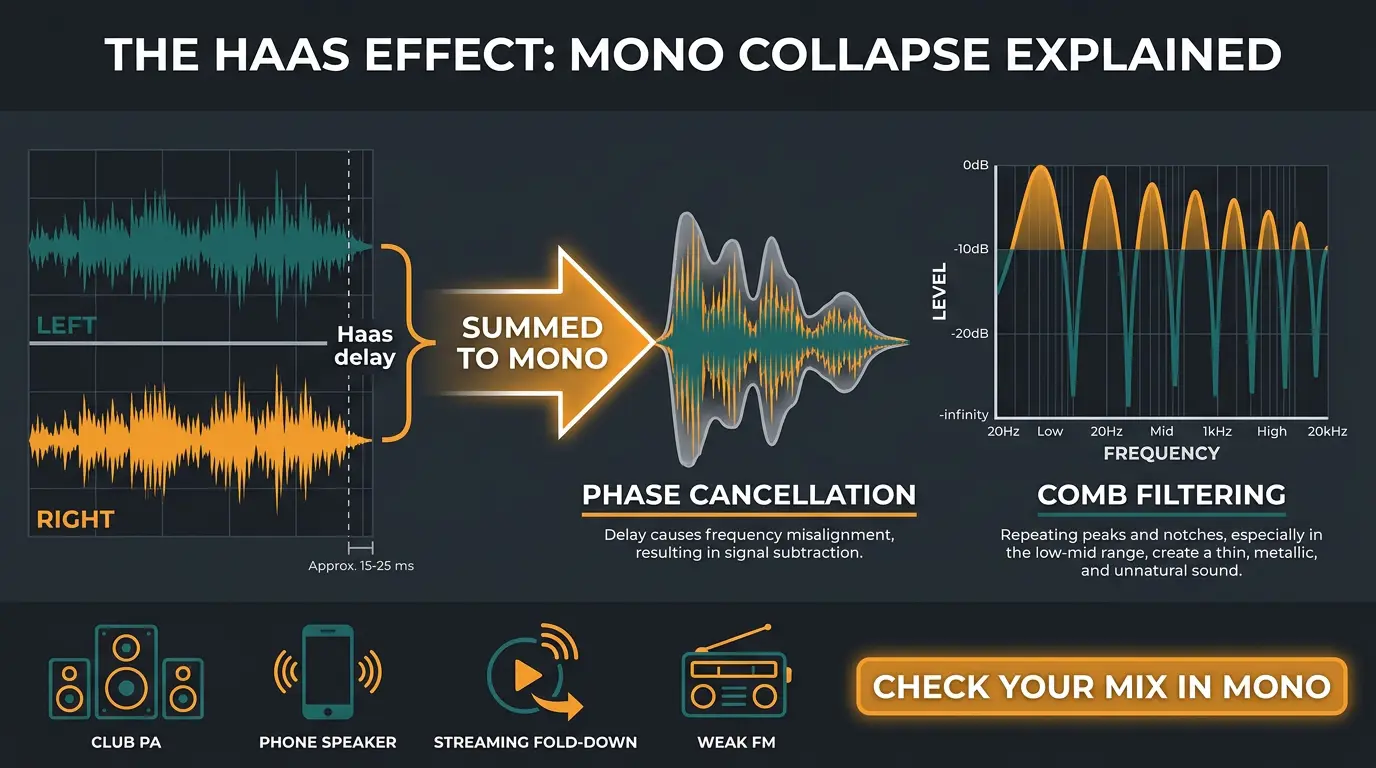
Here's the part the flashy tutorials leave out. That gorgeous wide sound you just made can fall apart the moment it's summed to mono. When the left and right copies collapse into one channel, their delay lines them up out of phase, and certain frequencies cancel each other out.
That's comb filtering — a repeating pattern of peaks and notches across the frequency spectrum. Your Haas'd part can thin out, change tone, or in bad cases nearly vanish. All that width becomes a hollow ghost.
And mono isn't some dead format. Club systems often run mono. Phone speakers are mono. Streaming platforms fold to mono in certain playback situations, and FM car radios drop to mono the second the signal gets weak. Make sure you check your mix in mono before you commit to any Haas move — flip your monitoring to mono and listen for anything that disappears.
How to keep it mono-safe
You can tame most of the cancellation without giving up the effect. A few habits that help:
- Keep the low end centered. Anything below roughly 200 Hz should stay mono. Low frequencies cancel the ugliest, so don't Haas your bass.
- EQ the two copies differently. Boost a band on one side and cut it on the other. When the delayed copy doesn't share the exact same frequency content, the two signals clash less and the comb filtering softens.
- Tune the delay away from the extremes. Too short and you get comb filtering, too long and you get an audible echo.
Be honest with yourself about the trade-off, though. Pushing the delay past about 40 ms does fix the cancellation — but it also kills the fused, wide effect you wanted in the first place. You'll just hear an echo. There's no free lunch here. A correlation meter like the free SPAN plugin lets you watch the phase relationship in real time, which beats guessing.
Alternatives and complementary tools
The Haas effect is one tool, not the whole toolbox. If mono compatibility is your worry, Mid/Side EQ is often a safer way to widen. Boost the high frequencies in the side channel and you get more perceived width while the center stays locked in place. It holds up in mono a lot better than a hard-panned delay.
There are also polarity-inversion variants of the Haas trick that tend to behave better when summed, so they're worth experimenting with if the classic method is giving you phase headaches.
With that being said, the effect works best as part of a bigger picture. Combine it with traditional panning, thoughtful EQ, and reverb, and you build a real three-dimensional soundstage. Lean on it alone and you'll usually end up with a wide-but-fragile mix. If you're weighing your space-making options, our breakdown of reverb vs delay is a good companion read.
Frequently Asked Questions (FAQs)
What delay time is best for the Haas effect?
Somewhere between 10 and 35 ms works for most sources. Use 5 to 20 ms for tight width on drums and rhythmic parts, and 20 to 40 ms for more spacious width on pads and vocals. Under 5 ms causes comb filtering, and past 40 ms you'll hear a distinct echo.
Does the Haas effect ruin mono compatibility?
It can, if you're not careful. When left and right sum to mono, the delayed copies cancel out through comb filtering, thinning or even removing the sound. It doesn't have to ruin anything, though — keep low end centered, EQ the copies differently, and always check your mix in mono before committing.
What's the difference between the Haas effect and the precedence effect?
They describe the same phenomenon, and people use the terms interchangeably. The precedence effect is the underlying psychoacoustic principle that we localize sound by its first arrival. The Haas effect is named after Helmut Haas, who popularized it through his speech-intelligibility research, though he didn't discover it first.
Can I use the Haas effect on bass?
Don't. Low frequencies cancel the hardest when a Haas'd track folds to mono, so bass and anything below roughly 200 Hz should stay centered. If you want a wider low end, use panning, layering, or Mid/Side EQ on the higher content instead — keep the actual sub mono.
Is the Haas effect the same as stereo widening?
It's one method of stereo widening, not the only one. The Haas effect widens by delaying a duplicated copy across the stereo field. Other approaches like Mid/Side EQ, panning, and stereo reverb also create width, and they often hold up better in mono, so it's worth combining them.
Final Thoughts
The Haas effect still earns its place. It's a fast, free way to take a flat mono sound and give it real width, and once you know the delay window you can dial it in by ear in seconds. Just respect the mono trap and check your work — that one habit separates a wide mix from a hollow one.
Use it where it counts, keep the low end centered, and don't Haas the whole session just because you can. Less is more, and your mono listeners will thank you.
Some of the links within this article are affiliate links. These links are from various companies such as Amazon. This means if you click on any of these links and purchase the item or service, I will receive an affiliate commission. This is at no cost to you and the money gets invested back into Audio Sorcerer LLC.